Hello folks, after a long time.
Funny thing, its actually has been a long time and the last time I designed the pencil sketch of the box and today after I designing a 3D version of the same box with wood and it has been a quite a good number of days in between.
But I want to mention here that the design I am posting here is a 3D rendering I designed from scratch based on the pencil sketch.
And I will keep trying to post more blog posts in here in the fields of interst and would appreciate the inspiration from you with your comments.
Doing it in 3D
Pencil Art work ; Abundance

Further enhanced version
Once again I went back to my drawings and drew somethings of a more abstract nature and after a scan of the sketch I added digital enhancements using Photoshop. In this art work the photoshop impact is heavy as it added more quality and flare to otherwise an ordinary graphic.
Enjoy!
Shot at Comic Character drawing; Wolverine

The transformation from the original scanned copy of pencil drawing.
Learn Yahoo Finance
Hello guys!
How have you been? I apologize for not being relatively active in the blog in the recent past. But the good news is today I am going to write about another lesson on Yahoo Finance, in the series of learning how to use Yahoo Finance for your investment purposes.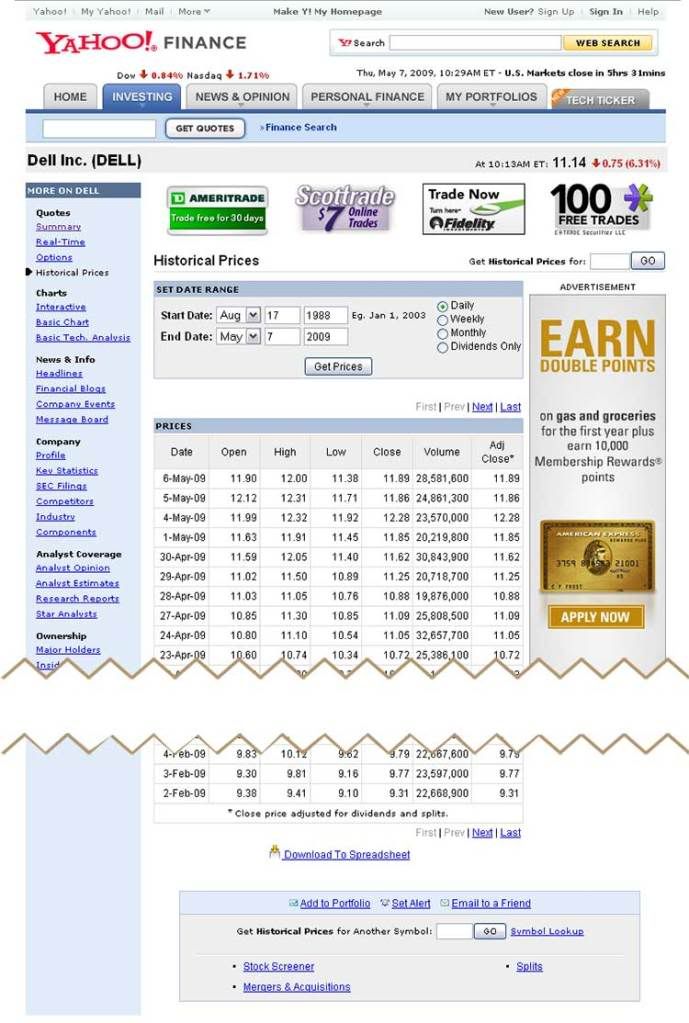
As you can see in the picture, we are talking today about Historical Prices section in the yahoo finance. Just like an eleven year old can tell you, its the past values for a stock.
In this section you can set your own date range for a company's stock on Daily, Weekly, Monthly, or Dividends only basis. One important thing to mention in here is that prices listed here are end of the day prices and they are already adjusted for Dividend and Stock split.
At the bottom of the page you have the opportunity to download this data set to an Excel compatible file.
So thats all on Historical Prices section on Yahoo Finance.
Personal Finance, better balance your income to expense
Personal Finance education or making people aware of better personal finance management skills, still I found to be a topic need addressed for the time being.
Typical example of ciaos of personal finances effect on economy goes like this...
Poor personal Finance management > Individuals borrowing money on credit > Poor planning cause individuals to not able to pay the borrowed money back in time > Banks that lend money in trouble > Banks asking for help from the government to survive > Bailout plan from Gov using tax payer money > Government debt sky rockets
The circle goes on and on as long as Banks continue to lend money to individuals that has no long-term solid means for repaying.
2nd 10 day Results for Traffic Counter experiment
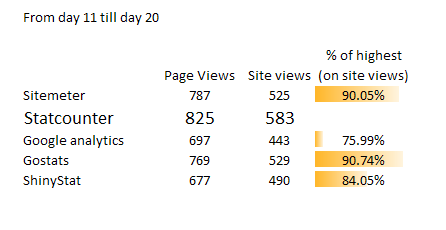
From the results for the day 11 till 20th, as you can see in the chart above, clearly shows a difference between categories. On the last column I have the percentage of that data set as of the highest data set, which is Statcounter.
We are 2/3 way to completing our experiment and so far in both occasions it seemed clear that StatCounter is the only site that record the traffic data relatively accurate. (In this case it means higher numbers -- the numbers that others failed to track)
If you have any other questions about this experiment as we progress to the last part, please feel free to ask them in the comments section.
How to use restrict access & blocking other PCs on LinkSys router WTR54G
Have you had situations where you are watching something or surfing web and the internet is really slow on your DSL/Cable modem and you share the connection with other people or you think other people accessing your wireless is whats slowing it down?
Linksys router and several other routers comes with internet access restriction features and also bandwidth limit features. In this post I will talk about Internet restriction and Mac filter, how to put these into good use to stop unauthorized access to your internet boradband connection with WTR54G Linksys router.
First access your wireless router from http://192.168.1.1 and with your username password, on default its "admin" you will see a window like this...
To use Wireless MAC filter
What this feature does is, it filter certain MAC addresses or block certain MAC addresses from accessing your wireless internet. The MAC address we are referring in this example is your computer's MAC address.
Note: to find out your MAC address; run cmd (command prompt) type "ipconfig /all" it should be referred to as Physical address.
Back in the router page, go to Wireless > Wireless MAC filter
Select Enable, and pick whether you want to prevent the PCs or permit only listed PCs. Then click "Edit MAC filter list" and enter all the MAC address you want or you dont want to access your wireless internet.
Click save changes. and you have just successfully stopped other people from using your wireless.
To use Access Restriction
Access Restriction (AR) will completely disconnect the internet of a certain PC you want you can also specify what time you want this to happen, on what days.
Go to your router access page;
Click Access Restriction
First Edit the list of PCs you are targeting in this AR. Save the list and close. (always save the list or else it would not record the MAC ids) You can allowed up to 10 of these AR policies with WTR54G model router. Give it a name Under "Enter Policy Name" select whether you want to deny or allow and the Days, Times, even web addresses. When everything is done select "Enable" on Status and save changes.
These two techniques are very powerful to a certain level in restricting internet access from your connection to unauthorized computers. But of course there are computer hackers out there who always find ways to creep through these barriers and locked doors and that's what makes the world!
Borrowing money (Loans) Simple version for Eager Learners
Borrowing money or on credit or taking a loan to pay it back later, all these terms refer to the same concept. And in this blog post I am going to break it down for you to understand the deep structure of what happen with borrowing money.
When you are borrowing money from a bank or an institution, you will be borrowing a large portion of money and will divide this into equal parts and pay it back over time with an added fee. This is called the interest on a loan or a credit.
On the opposite side, this is how banks make money. By lending to people and receiving interest on them over time.
There is a "Time value of money" concept involved in the simple money borrowing situation. In other words the Interest you are paying for bank loan (after 1 period) is the value of money over that one period, which you didn't pay until the end of the 1st period. So longer the money stays the higher the time value of money becomes.
It also refers to receiving XX today being equal to receiving YY over periods in the future because of the time value that is taken into account for the money.
For example lets assume you are planning to buy a new Car and you don't have enough money, so you decide to consult a bank as to a potential loan program. For this example lets say you need another $30,000 for the car, that you need from a loan.
Assuming that you met all the criteria the XYZ bank agrees to lend you money at 5% APR.
what is APR?
Annual percentage rate. Now if the bank say you have to pay the $30,000 in 10 years with equal payments of $3000 every year, the APR is the annual interest that will add onto the annual payment. So in this case your interest payment for a year is....
$3000 x 5% = $150
so total payment is $3150 per year.
Important part here is before you accepting the loan and enjoying your hot wheels, you should thoroughly consider whether you can meet these annual payment requirements. Because you can not meet the annual payment with interest, the bank will apply late fees, and that will lead to more other fees before you go "over draft" and into default. So called the "snowball effect".
Little insight: The United States current economy's main cause -- AIG and other big financial institutes failures -- is lending money to individuals and approving them for loans when it seemed from a deep look that they, not in any shape or form, would have been able to meet in the payment requirements in distant future. Yet were approved and the banks now suffer from the imposed-upon defaults.
So in recap, when you borrow money you will be given a certain set period to pay it back with added interest to each period. It is very important to identify whether one can meet the payments sufficiently before accepting a loan.
What is RSS, Simple version for eager learners
RSS, Real Simple Syndication.
There has been exponentially increasing number of web blogs and news websites in today's world. But in this enormous information jungle how are you going to find the information that you need, the information that matches your taste??
In old days, what used to be was, people go out there and watch TV and read newspapers to get the information from out there. Which involve reading the entire Newspaper, meaning more time spent to find what you like. But now with the invention of blog everyone has the capability of producing high quality content that may prove a great value to you, to your knowledge base. This had made it difficult to find the information you like and that has a higher value to you.... and that's when the RSS comes. RSS with the familiar icon like this is the solution for today's world to have those content that have a great value to you, to come to you and not you having to go out there and spend hours finding content of importance.
With a reader like Google Reader (or NewsGator, My Yahoo) you can stay upto date with your favorite sites and blogs for the information that you value. And RSS or the xml version of the websites and blogs makes it easier for these Syndication readers to capture those information and bring it to the reader's website so you only have to visit Google reader and have the luxury of reading latest articles and blog posts of all your favorite blogs and news articles,
all at one place.
Add ashPresentom to your newly created Reader now!

10 days update of traffic counter experimental study
It has been 10 days since we started the experimental study to find out which traffic counter is more accurate (well relatively accurate). As I mentioned in the introduction experiment page, I will be posting results every 10 days from the date we started the experiment, today I will be posting the results here.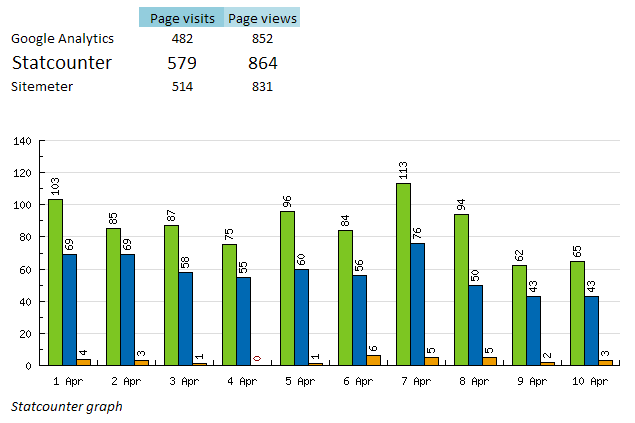
Results
So clearly from the table we can see that Statcounter had recorded more hits and pageviews than any of the other two.
If we assume our determinant is Page visits (Total views), Google Analytics have the lowest, which in other words (for this experiment) means it had recorded the lesser of visits to ashPresentom over last 10 days.
If we assume our experiment determinant is Page Views, in which case sitemeter becomes the lesser to have recorded a low number of page views.
It has only been 33% of our expected experimental period and these results are starting to clearly tell us which site measure website traffic accurately.
Additions after 10 days
I have added to the site after 10 days another 2 FREE website traffic counters you can find out there. In selecting the counters I paid close attention to the way they display results and easy installation and navigation.
New additions are;
4. ShinyStat (http://www.shinystat.com/)
5. GoStat (http://gostats.com/)

Anna Faris iPhone Wallpaper
This blog post will feature Anna Faris in iPhone Wallpaper. She cast in the recent movie Observe and Learn as the character of Brandi. Enjoy!
Click here to download the iPhone wallpaper
How to make hover button for website (mouse rollover button) with CSS/HTML
Today's post is going to focus on creating a roll over button using CSS and HTML just like the one you see above. And I will go over getting it to work with IE as well.
In website designing, website designer care a lot about website loading time and pay a great deal of time coding in a way it would make the site load faster. For instance if you want to do a rollover button, where you would have a button like this (inactive)

and switches into this image once you move your mouse over the image (button)

You would have to have two different pictures loaded into viewers computer to show this, meaning longer time to load two images as oppose to one.
Lets look at the file sizes of these two images;
They both are in gif fully optimized form,
inactive image is 4.21KB and the active image is 4KB. Total of 8.21KBs
What if you could use only a single image which has both rollover and inactive images in a single image??
Like this one..

This combined image is 7.53KBs not much of a difference but it is something. And loading a single image is always faster in website world than loading more images.
How do you make a rollover button with single image with both active and inactive images in one. First of all you have to design this button with precision. In the above button it has width of 400 pixels and height of 100 pixels which is 50 to one and 50 to other.
After you have designed the button image using this CSS and HTML code you can easily.
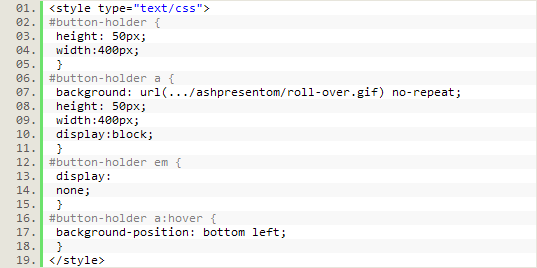
CSS code for this feature
HTML to in the body

Portions that make this code work in IE is "display:block" and associating the image to "a" rather than using <img> or linking to <div>.
Break down of the roll-over CSS effect;

With this code we are telling to move the background image of <a> tag to move up by describing its new position which is starting from bottom-left corner.
"a:hover" is the CSS hover or mouse roll-over associated code we use here in CSS.
Fast and Furious 4 poster design

Featured here is a poster design of the lastest action movie, Fast and Furious 4, by aj designs. If there are enough requests there is a possibility of producing a wallpaper based on this poster. So let me know...
Rachel Mcadams iPhone wallpaper
iPhone Wallpapers blog posts series.
As iPhone becoming an added gadget in people's lives, there had to be a certain amount of specialty be granted for enhancement of its usages and outlook. ashPresentom will assist our dear viewers in colorizing and adding killer graphics to your iPhone background with series of iPhone wallpaper backgrounds following this blog post. So check out again for our future iPhone background wallpapers.
Note: content here published under ashPresentom iPhone wallpaper blog posts series are a sole property of ashPresent.blogspot.com. These can only be republished with the mention of ashPresent.blogspot.com. 
Download Rachel McAdams iPhone Wallpaper
State of Fear by Micheal Crichton

Great novel by Micheal Crichton, talks about Global Warming. I found the topics discussed in the novel to be of truth, and the provided references to articles clarifies Crichton's points across.
A speculation of the global warming as discussed in here, writer takes you on a course where you will see the elite planning events that create world catastrophes artificially, such as detonated blasts in Antarctica that creates huge ice bergs, and Cavitation generators in use to create undersea land slide that trigger a Tsunami from Solomon islands.
Group of fully aware people find clues to these events and follow them in an attempt to stop these catastrophes from happening. On the other side, elite plan conferences focusing global warming -used as a state of fear to control humans- are expecting these catastrophes which will help them prove their point across to humans that Global warming is causing these events.
Fascinating script and story line, Crichton expressively provide statistics and build the story to a great phenomenon.
aP Novel rating of
4.7/5.0
Download eBook version of State of Fear by Micheal Crichton
Click here
Other Novels Featured on ashPresentom
Simple Genius by David Baldacci
Hour Game by David Baldacci
The key for readable clean Typograhpy

Achieving readability is relatively easy; all it takes is to follow a few key practices. A readable Web page can go a long way with your users, and readability has a huge impact on their experience. Designing for the Web is all about making the user’s experience as pleasant as possible. Here are 9 tips that will help you work towards readability.
1. User-Friendly Headers
Headers are a key element in typography, Web and print alike. As mentioned, they are part of the text hierarchy and a major factor in scannable content.
First off, header size is just as important as the size of the body text. Going too big with the header with a large amount of content can throw the user off balance when reading and cause them to lose their spot. It will ultimately ruin the flow of the content and be a distraction. Headers that are too small will ruin the hierarchy of the article, too. If the header is too small, it will not draw the user’s attention as it should.
Next, it is important to provide ample space between the header and body text.
2. Scannable Text
I have already mentioned “scannable” text many times, and you have surely heard it elsewhere. Scannable text goes hand in hand with readable text. Making copy scannable consists of good use of headers, hierarchy and focus points to guide the user through the content.
So, what makes copy scannable? Well, there are many factors, most of which have already been mentioned. Header size and position, body text size, text line height, text contrast and the way focus points are differentiated all impact how scannable copy is.
Focus points are certain elements or objects within the layout that attract, or are supposed to attract, the user’s attention. This could be a header, a graphical element, a button, etc.
3. White Space
In content-heavy layouts, spacing contributes to the readability of content. White space helps to offset large amounts of text and helps the user’s eyes flow through the text. It also provides separation between elements in the layout, including graphics and text.
In the example below, white space and only white space is used to separate text elements. The layout is very clean and efficient. The user’s eyes flow from text element to text element with ease, because of the large amounts of white space.
4. Consistency
Consistency is often regarded as an important technique for usability, but it also applies to readability. Consistency in the hierarchy is important to a user-friendly layout. This means that all headers of the same importance in the hierarchy should be the same size, color and font. For example, all < h1 > headers in an article should look identical. Why? This consistency provides users with a familiar focus point when they are scanning, and it helps to organize the content.
5. Density of Text
Density of text refers to the amount of words you place in one area. Density of content has a major impact on your content’s readability. Density is affected by spacing options such as line height, letter spacing and text size. If you find a balance between all of these so that the content is neither too compact nor too widely spaced, you will have perfect density that is both readable and scannable.
6. Emphasis of Important Elements
Another key factor is emphasis of certain elements within the body content. This includes highlighting links, bolding important text and showing quotes. As mentioned, focus points are essential in Web typography. By emphasizing these objects, you provide focus points for the user. These points and objects help break up monotonous text.
Scannable text is extremely important. By providing these focus points,, you make the body text extremely scannable. Bolding key lines of text immediately attracts the user’s eye and is therefore a very important element in presenting important information.
Pictured below is an article from UXBooth. This article uses bolding and italics to point out important information in the article. This is a very readable article and very easy article to scan for information.
7. Organization of Information
Believe it or not, the way you organize information in an article can strengthen readability. Users are guided with ease through content that is properly organized because information is easier to find. This veers into issues beyond the scope of this article but is still very important.
8. Clean Graphical Implementation
Every text body needs some sort of visual support, be it an image, icon, graph or illustration. Placing the graphic in the article can be challenging. Sufficient space is needed between the graphic and text.
If the graphical element is an image, then a clean border is a good idea for providing a clean separation from the text. Borders can help guide the user’s eyes and are good for adding style to content. It is important, however, to keep borders in content simple. They should have a subtle color palette and shouldn’t be too large.
In the case of graphical elements such as icons and illustrations, space is the only separator that should be used. The content should move cleanly around the graphic without disrupting the text.
9. Use of Separators
Separators are a simple and easy way to divide text into sections in a clean and organized manner. They can be used to divide hierarchy elements, such as headers and body text. They can also be used to divide content into sections.
The simplest form of divider is a single line. These are most often used to divide hierarchy elements and are very useful for making subtle divisions that still play a big role in readability.
Another common way to divide content is to use boxes. Text boxes are excellent for separating unrelated content on a single page. They help move the user’s eyes through a complex layout. Below is an example of this on Pixelmator’s website. It uses boxes to separate content in a clean way. Notice how the boxes are defined by their background instead of a border.
10. Good Margins
You hear people say that you should use white space, but why? White space actually helps draw the user’s eye to the text. The blank area (white space) forces the eye to focus on the text. So white space will influence the flow and readability of content. Margins are one of the best white space elements and support text elements well. Margins on either side will force the user’s eye to focus inward on the core content of the article.
Margins also support the article in another way. They help separate content from the rest of the design and layout. Text shouldn’t bleed into other layout elements, especially if it is a long article. Margins help define the article and its separation.
References:
http://www.smashingmagazine.com/
Embed RSS feed into a html webpage part 2
In the previous webdiv topic about RSS feed we talked about including someone else's RSS feed into your website. In those examples we used sites like feed2js, whome take your xml feed link and convert xml to html and show the results in a java script format.
Disadvantages of this option:
Since it is a third part site, they have an allocated amount of bandwidth for a day or for an hour for each of these tasks. So if your site is heavily visited and would show this RSS feeds regularly, there is a higher chance you would exceed this bandwidth limit and have a blank space.
One alternative for this is to try the server side solution, which in most cases is download and upload to server type of operations, but could get complicated with the number of files involved.
Site like www.feed2js.org, you can download this script files and the converter files. This you will install into your server, now it will use your own bandwidth and will not run out of it as fast.
Another solution is a site called www.grazr.com This site will provide an animated/interactive widget formed using your RSS feed link, which can be placed in your website quite easily. I have tried this and it has not run out of bandwidth limit for me yet.
www.wowzio.com, www.springwidgets.com are two more websites that provide a widget from your RSS feed link.
Website visitor counter testing on ashPresentom
There are numerous website counters today used by bloggers and other website publishers to track their visitors and in-depth analyze what their visitor's did in those websites. Today we are not going to compare those stat counters on their features, but what we are going to do today is, to see which stat counter is the most accurate.
At ashPresentom we receive at an average of about 60-70 visits per day according to statmeter.com website which we have installed in here. Because of this relatively good number of visits, I am going to be using ashPresentom as the subject for this experimental study. 
In this study I am going to be testing Google Analytics, Sitemeter, and Statcounter some of the best counters out there that are free for use. I have installed the required codes to this blog, to enable these counters, at 12:00 am on April 1st and we will use the data from April 1st till April 30th, 11:59pm.
Most of the time, if a website received a visit of less than 1 second, some counter's code fail in recording this as a legitimate visit. This will create inequality between traffic counters. A more defined goal of this experiment at ashPresentom is to find which statcounter provide an accurate reading of site visitors out of the three options we used.
At the end of first 10 days, second 10 days, and last 10 days I will record the numbers in here for aP viewers to have a look at how this experiment is progressing.
In the meantime if you feel there has to be added, another big player from "free traffic counter" group, please feel free to let me know. I will be able to add additional options to this experiment at the end of 1st 10 days and 2nd 10 days to maintain the accuracy of this experiment.
Note 0.01: Parameters of this experiment is; Page views and Total visits.
Simple Genius by David Baldacci
ashPresentom Novel Review.
Today's novel we are going to review is Simple Genius by David Baldacci. This book is the 3rd of the Sean King and Michelle Maxwell series. Specialty about today's novel review is that I am going to include the "Novel level of appeal, excitement, and suspense" graph.
Making of the "Novel's level-of-appeal graph"
As I mentioned above this will be an approximate and an average of the level of excitement and appeal as you read the novel. When I design this graph I will recall the novel from my memory and prescribe a number out of 10 for that part of the novel. I will divide the novel into 30 periods for the above process. Since the ranking will take the full judgment of my own senses and feelings, the graph can be used only as an approximate implication of the novel's level of appeal. Without further ado, here is the Novel's level-of-appeal graph.
 aP Overall Ranking:4.7/5
Yet another great novel by David Baldacci. Story start from the last book, and the things going on in Michelle Maxwell's live in the first part of the story and how it evolve around level of appeal to the reader, I have described in graphical form above.
The story in this novel focuses on a drug scheme run under the covers orchestrated by CIA in particular. The location of this drug operation take a great importance in history as to a place where World war German soldiers were kept and tortured. In the vicinity is a facility that strive to design the next generation of a supercomputer, thus surrounded by Genius scientists. The investigative work for Sean King starts with the murder of one of the Scientists involved in Baggage town.
This was the scientist who discovered an secret tunnel made by German captives to escape from the prison facility, and what he saw was put into a secret code, which was programed to his daughter, Viggie. Who was also a genius with the capability of finding primes of big numbers in head at the age of eleven. Although she lived in her own world and space out of real life at times, Sean King and Michelle maxwell had to get the secret code or hints for revealing the code from her.
Altogether a great story line and fantastic use of codes and mystery hunting.
Subscribe to:
Posts (Atom)
Search

Bookmark and Subscribe to ashPresentom